National Identification Authority is giving Ghanaians the chance to register for the new Ghana Card online from the comfort of their homes.
In a new post on their facebook page, they shared the link to the new online process for registering Ghana Card.
Although the mass registration is ongoing, the NIA is doing the registration of individuals interested in booking an appointment through their new online portal https://register.nia.gov.gh/
What you need to apply for your Ghana Card Online
- Digital Address Code – You can check here
- One of the following ID Cards:
- Voter ID
- Driver’s Licence
- NHIS
- Birth Certificate
- Passports
- SSNIT
How to Apply for a Ghana Card Online
Visit the Ghana Card online registration portal by clicking this link: https://register.nia.gov.gh/

For first time users, create an account and verify your phone number.
You will receive a text message with a secret code. Enter that secret code to continue to the application dashboard.

When on the dashboard, click on “Start New Application” to be sent to a page to begin the information collection process.

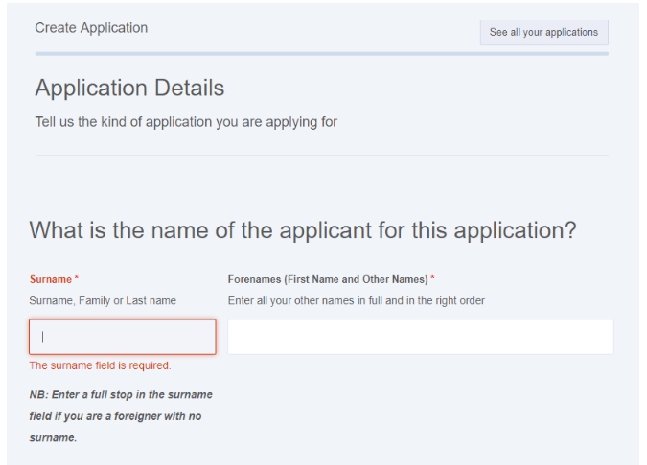
On the next screen, fill in your Surname and Forenames (First Name and Other Names). Enter a full stop in the surname field if you are a foreigner with no surname.
Next, answer the questions relating to your nationality and Citizenship.
You will be asked to enter your height, eye colour and other physical identifiers on the next page. (If you don’t know the accurate value, don’t worry, during your registration, the NIA will measure you for the correct value).

After all the 7 pages of the form have been filled, you will be taken to a declaration page.
You will have to say “YES” to the following:
I Declare that all the information presented for this application is true and correct and that the documents that I have provided for the purpose of this application are genuine.
I understand that if any information that I have provided for this application is false or incorrect, I will be liable to prosecution in accordance with Section 40 of the National Identity Register 2008 Act 750 as well as any other law or regulation which may be in force at the time.
I understand that all the information and documents that I have provided in respect of this application are handled and stored by the NIA and I have the right to have them updated should they change.
I declare that all the information contained in this application has been read, interpreted and explained to me in a language I understand and I perfectly understood and approved same before my hand was guided to make my mark.
After that, you will get the option to download the completed form. You will also receive an email with a link to the completed application form. In your application history page, click the ‘Download Application Form’ button to download your application for print.
Once you have printed the form, visit ANY National Identification Authority (NIA) registration centre with a printed copy of your application form to apply for your FREE Ghana Card. Remember to send all mandatory documents with you to the NIA registration centre.
How long will it take to get the Ghana Card?
Once you have downloaded the form, you will get your Ghana Card instantly at any NIA Registration Centre you visit.
This is however subject to the availability of electricity and internet connectivity.
Thank you for reading. Share with your family and friends.
For your latest news updates, subscribe to thrillernewsgh.com